
Daily Instagram Reels Viral Outlier Spy Agent

This agent runs every morning, scans every creator you follow, finds the videos that went way more viral than usual, and drops a full breakdown into a Notion database. Views, transcript, why it worked, and a fill-in-the-blank template you can use yourself.
Here's how to set it up.
What You'll Need
- A Twin account → twin.so
Setup takes about 15–20 minutes.
Step 1 — Create Your Twin Account
Go to twin.so and sign up.
Twin is a no-code agent builder — you describe what you want in plain English and it builds the automation for you. No coding required.
Step 2 — Build the Agent
Start a new agent in Twin and paste the prompt below exactly as written.
You don’t have to use this exact prompt you can just talk to it and it would figure out itself and how to set it up.
If it needs anything it will ask you :)
The Prompt
Build a daily Instagram Reels outlier discovery agent.TRIGGER: Every day at 6:00 AM (my local timezone).
DATA SOURCE: A fixed list of Instagram creator handles stored in SQLite table
followed_creators(handle TEXT PRIMARY KEY, active INTEGER DEFAULT 1, last_error TEXT, last_checked_at DATETIME). Seed with these handles (no @ prefix, lowercase):[insert your instagram handles here]
PIPELINE (every run):
- DORMANT-CREATOR SKIP: For each active handle, if their most recent reel is older than 30 days, silent-skip and record
last_error='dormant_30d'.
- SCRAPE RECENT REELS: Batch-call the Apify Instagram actor to scrape recent reels (last 30 days) for all active creators in one call. Capture per reel: URL, thumbnail URL, view count, post timestamp, caption, creator handle, creator follower count.
- PER-CREATOR BASELINE: For each creator, compute the median view count across their last 10 reels, excluding the candidate reel. If fewer than 5 reels total, silent-skip (
last_error='insufficient_reels').
- OUTLIER RULE: A reel qualifies if views >= 3.0 × creator median AND posted within the last 7 days. Rank all qualifying outliers by ratio (views / creator_median) DESC.
- CROSS-DAY DEDUP: SQLite table
seen_reels(reel_url TEXT PRIMARY KEY, first_seen_at DATETIME, creator_handle TEXT, notion_page_id TEXT, written_to_notion INTEGER DEFAULT 0). Filter out any URL already present withwritten_to_notion=1. Only markwritten_to_notion=1after Notion write is verified.
- BACKFILL-TO-10 WITH HARD CEILING: Process ranked outliers in batches of 15, 10, 10, 10, 5 (max 50). For each, transcribe via Apify Social Video Transcriber (actor ID: CVQmx5Se22zxPaWc1). Reject transcripts that are: empty, under 15 words, or pure song lyrics. Stop after 10 reels pass or 50 candidates examined.
- ANALYSIS per reel (one LLM call each): Extract: HOOK (verbatim first line), HOOK TYPE (controversial claim / curiosity gap / contrarian take / pattern interrupt / list promise / other), STRUCTURAL BREAKDOWN (3–5 bullets), WHY IT WORKED (2 sentences referencing creator baseline), STEALABLE TEMPLATE (fill-in-the-blank format).
- NOTION WRITE: Use Notion OAuth. On first run, create database "Viral Reels — Daily Outliers" and cache database_id in SQLite. Create a page per reel with cover set to thumbnail URL. Page body: image block, callout (📈 ratio), then Heading 2 sections for Hook, Hook type, Structural breakdown, Why it worked, Stealable template, and Full transcript (in a collapsed toggle, chunked at 1900 chars). After creating each page, verify via retrieve_page that in_trash=false and parent.database_id matches. Only then set
written_to_notion=1. Create Gallery view (large cards) and Table view ("Full table"), both sorted by Ratio DESC.
- GUARDRAILS: Per-creator scrape failures are silent skips. Global abort only if first 10 consecutive scrape calls all fail. Zero-outlier runs finish cleanly and write nothing.
- RUN LOG: SQLite table
run_log(run_date, creators_checked, creators_skipped, creators_scrape_failed, candidates_found, candidates_examined, reels_written, errors). On completion, log total entries written, top 3 outlier ratios, and Notion database URL.
Step 3 — Customize Your Creator List
The prompt above comes loaded with AI/tech creators. Replace them with whoever you actually follow in your niche.
To edit: just tell Twin in the chat after building:
"Replace the creator list with these handles: [your list]"
Tips for a good list:
- 30–60 creators is the sweet spot
- Only add people whose viral content you'd actually want to study
Step 4 — Set Your Trigger Time
The default is 6:00 AM your local time. To change it, tell Twin:
"Change the trigger to run at 7:30 AM instead"
Step 5 — Run It for the First Time
Hit Run in Twin. The first run will:
- Create the Notion database automatically
- Scrape your creator list
- Find any reels that spiked in the last 7 days
- Write breakdowns to Notion
Depending on how many creators you have, the first run takes 5–15 minutes.
Step 6 — Two-Minute Notion Polish (Manual, One Time)
The Notion API can't do a couple of things automatically — handle these once after the first run:
- Set card size to Large if it defaulted smaller (database → ••• → Card size → Large)
- Optional: Add a filter "Post date within past 30 days" to the Gallery view to keep it fresh-looking over time
Step 7 — Making Custom Interface
- Click on the Agent Name on the left hand side (in my case it was “Viral Reel Finder”
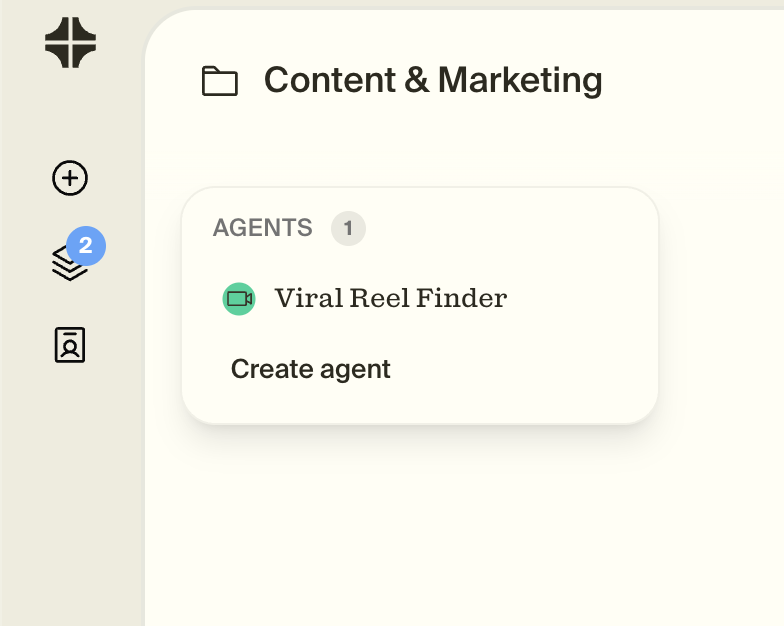
- On the right top corner click interface

- Talk to it and describe what kind of interface you want :)
What You Get
Every morning you'll wake up to a Notion database with new entries that look like this:
- Thumbnail of the reel
- View count and outlier ratio (e.g. "6.2x creator baseline")
- Hook — verbatim first line
- Hook type — so you can filter by what's working
- Structural breakdown — how the reel was built beat by beat
- Why it worked — 2 sentences anchored to that creator's normal performance
- Stealable template — fill in the blanks and you've got a script
The same reel never appears twice. The agent deduplicates across every run so the database only ever shows you newly emerging outliers.
Customization Levers
Once it's running, you can adjust anything by telling Twin in the chat:
| What to change | Example message to Twin |
|---|---|
| Outlier threshold | "Change the outlier threshold to 5x instead of 3x" |
| Time window | "Only look at reels from the last 3 days" |
| Entry count | "Write up to 15 reels per run instead of 10" |
| Creator list | "Add these handles to the creator list: [handles]" |
| Trigger time | "Change the run time to 7am" |
Troubleshooting
No reels showing up after the first run
This is normal if no creator spiked in the last 7 days. Wait a day or two and let it run again. You can also lower the threshold to 2x temporarily.
Apify errors in the run log
Apify's Instagram scraper occasionally hits rate limit windows. The agent skips failed creators and retries them on the next run automatically.
Notion database wasn't created
Check that your Notion OAuth connection is active in Twin → Apps. Reconnect if needed, then trigger a manual run.